🛰 Test Reports
🔎 Test Report Purpose
- 🛰 Share information
- 🔄 Keep the team in sync
- 🏃 Increase efficiency
- 💁 Increase convenience
- 📡 Improve communication
👀 Visibility
🗺 Test Reports should be announced in 3 Places:
- 🗂 The Task Description
- 🗂 The Task Activity
- 📲 The appropriate Slack Channel
🗂 Task Description
🌱 This is where the "living" QA will occur.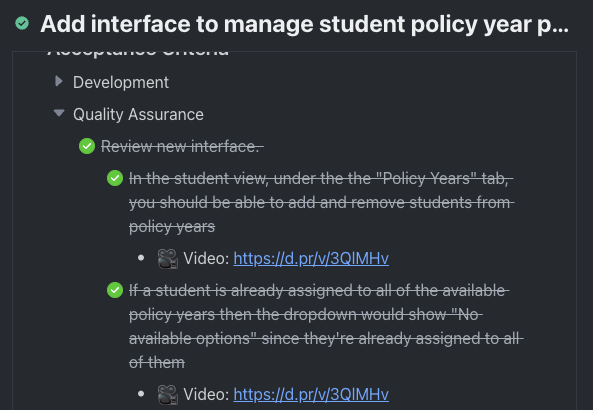
- 📝 The QA Analyst will initially setup the acceptance criteria and run through the tests in this space using the checklist format:
- ✔️
/checklistin Task - to identify each requirement in the tree - 🚄
/bullet listin Task- ⬇️
markdown"-" in Task or Slack to identify Notes and Media ( 📷 Scrot / 🎥 Video ) which are not requirements.
- ⬇️
- ✔️
- 📝 The Description pane is on the left side of the Task and will have the latest test report.
- ✍️ Therefore, if the QA Analyst is testing on a task for the 2nd time, they should remove any screenshots, videos, or notes on failing behavior which are no longer relevant/observable.
🗂 Task Activity
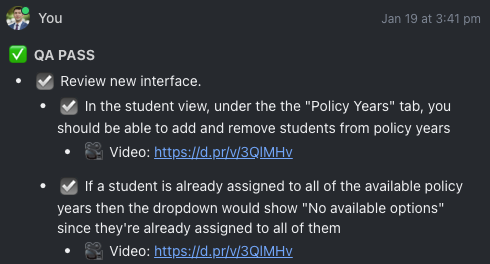
- 🏇 Once the QA Analyst is finished with a round of testing they need to copy the current state of the Acceptance Criteria (whether it passes or fails) to the Activity pane on the right-side of the Task.
- ✍️ At the top of the Test Report in the Task Activity should have the heading:
- ✅ QA PASS (where QA PASS is UPPERCASE and Bold.)
- 🛑 QA FAIL (where QA FAIL is UPPERCASE and Bold.)
- 🚫 BLOCKED (where BLOCKED is UPPERCASE and Bold.)
- 🏈 PUNT (where PUNT is UPPERCASE and Bold.)
- 🏟 (When specific requirements are "punted" they can be prepended with the "🏈" emoji within the Acceptance Criteria, followed by an indented child-bullet-point linking to the task where the punted requirement was moved.)
- ✍️ At the top of the Test Report in the Task Activity should have the heading:
- 📑 In copying the
Acceptance Criteriafrom theTask Descriptionto theTask Activity.- ✔️ The Checklist/requirement lines need to be converted to bullet-points.
- ✔️ Checked requirements need to have the pass emoji ( ☑️ ) prepended.
- 🕵 The copied
Acceptance Criterianeed be inspected to ensure accuracy and completion.
- 🥇 Duplicating the
Acceptance Criteriain theActivityserves as a historical log.- 📖 This is useful in retrospectives and verifying whether any requirements regressed, were missed, or were not tested properly.
- 🕵 This also serves as an opportunity for the QA Analyst to double-check the test report and ensure no requirements were left untested.
📲 Slack Channel
- 📢 Test reports can be announced in the appropriate Slack Channel relevant and convenient to the team
- 💾 The Test Report in the Slack Channel should be formatted consistently:
[Emoji] **RESULT** - [Task Custom ID] - [Task Title]
📺 EXAMPLE
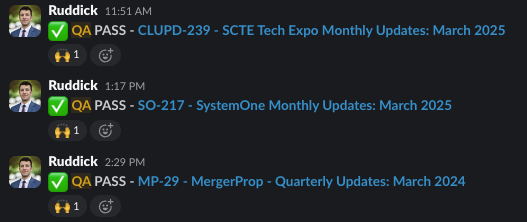
✅ QA PASS - SSR-734 - Add analytics functionality to the application
- TEST REPORT
- 📝 The Format always starts with the Emoji, then Results such as:
- ✅ QA PASS (where QA PASS is UPPERCASE and Bold.)
- ⚠️ Currently we are going to only share Passing tasks in the Slack channel.
- 📝 If the task fails, we are having QA reach out to the Developer directly.
- ⚠️ Currently we are going to only share Passing tasks in the Slack channel.
- 🛑 QA FAIL (where QA FAIL is UPPERCASE and Bold.)
- 🚫 BLOCKED (where BLOCKED is UPPERCASE and Bold.)
- 🏈 PUNT (where PUNT is UPPERCASE and Bold.)
- ➡️ Then a dash '-' followed by the Task's Custom ID, then a dash '-' then the Task Title.
- ➡️ The Task Custom ID, dash, and Task Title should be hyperlinked to the task URL.
- ➡️ We also want the Test Report linked to the relevant Task Comment where the report is logged.
- ➡️ However it is okay to skip the Test Report if there is hardly any, just one, or no requirements.
- ➡️ Then a dash '-' followed by the Task's Custom ID, then a dash '-' then the Task Title.
- ✅ QA PASS (where QA PASS is UPPERCASE and Bold.)
🤔 Why Announce the Test Report in the Slack Channel?
📢 Announcing the Test Report in the Account Channel may seem redundant, however there are several critical advantages which prove invaluable:
- 📡 It keeps the task on the Developer’s "Radar" - the instant notification often ensures the task receives the appropriate priority in the Developer's queue.
- 👀 It gives any Designers, Project Managers, Stakeholders, etc an opportunity to see the Acceptance Criteria which provides a few opportunities:
- ⏭️ They can assist in maintaining the teams constant progress.
- 🗣 They can leave comments or questions.
- 🧑🏭️ They can provide insight in unblocking or correcting any problems/misunderstaning - offering root-cause analysis.
- 🙅 They can disagree with any passing or failing requirement.
- 🏈 They can determine if any requirements or newfound issues are out-of-scope and should be refined.
- ✨ New development opportunites can be discovered.
- 🧐 They get more visibility on the scope and requirements in different aspects of the application so the team is more in sync with expectations.
- 📱 Developers can see the Test Report while on their mobile device away from their computers and "marinate"/think about any failures or problems such that when they return to work on the task they may have already thought about a solution.
- 🕰 Finally, it provides a nice timeline in the account/client channel to refer to in the cadence of the other discussions, pull-requests, code reviews and deployments.
- ⏭️ They can assist in maintaining the teams constant progress.
🤔 Which Slack Channel is Appropriate for announcing Test Reports?
- 🔊 It may be way too much info to have a separate channel for every aspect of an account/client.
- 🎤️ Test report announcements should ALWAYS be threaded.
- ⚖️ However in some cases a separate QA Slack Channel for a client would make perfect sense. So far, most people agree using the same Account/Client channel everyone else uses is best in most cases.
- 🤸 The main goal is to reduce unnecessary channel bloat.
- 🧠 So far the prevailing opinion is:
- 💡 If an account/client channel is not very "busy", keep the QA Test Reports in the single channel.
- 💡 If the account/client channel is for a big project and the chatter in the channel is constant, perhaps a separate channel such as
#account-qais warranted.- 🤔 Ask the account manager/developers what makes sense for them up-front.
Table of Contents